Kamis, 09 April 2015

Tor Browser Bundle 4.0.7 portable

Tor is a toolset for a wide range of organizations and people that want to improve their safety and security on the Internet. Using Tor can help you anonymize web browsing and publishing, instant messaging, IRC, SSH, and other applications that use the TCP protocol. Tor also provides a platform on which software developers can build new applications with built-in anonymity, safety, and privacy features. The Tor Browser Bundle lets you use Tor on Windows, Mac OS X, or Linux without needing to install any software. It can run off a USB flash drive, comes with a pre-configured web browser to protect your anonymity, and is self-contained. 

Surfing anonymously provides a powerful shield against network surveillance and traffic analysis. Protecting your online privacy can only be achieved by additional software tools that can hide your location and can prevent your online information and browsing habits from being revealed to anyone.
If you’re ever in need of such a tool, Tor Browser Bundle is one suggestion you can add to the list. The application relies on a network of virtual servers in order to make your browsing sessions anonymous. Tor makes available a set of rules and algorithms that routes the communications through various servers all over the world. Thus, all the traffic is randomized so tracking the source becomes an almost impossible task.
The download package is a self-extracting archive that includes the Tor application itself, which can be run from command line, a cross platform controller GUI named Vidalia and a custom-made version of Firefox equipped with a set of addons that ensure online anonymity.
We advise the average user to consider using the Vidalia application, because the graphical interface puts you through a lesser ordeal than the command prompt version of Tor. When you first run Vidalia, it automatically connects to the Tor network and if the process is successful, a status will be displayed in the main window.
Vidalia’s interface encases a collection of shortcuts that allow you to stop the service, to start setting up the relays, to trigger a global view of the network and most important of all, it sports a button for using a new identity any time you wish. If you’re interested in bandwidth usage, Vidalia features a separate utility just for showing a bandwidth graph that measures the receive/send rate of the packets.
The portable Firefox version included in the download package is customized with a few extensions that make the anonymous surfing experience easier. These include: Torbutton – allows you to create a new identity each time you start a browsing session, NoScript – blocks scripts from untrusted domains and HTTPS Everywhere – enables you to encrypt the communication with a lot of popular sites.
With all the components it encases, Tor Browser Bundle is one of the most trustworthy anonymous surfing tools out there. It can be configured from command prompt, run from its dedicated GUI controller – Vidalia and comes with a pre-configured web browser. Whichever of these methods you choose the result is a safe and controlled Internet browsing experience.
Download | Tor Browser Bundle 4.0.7 portable
PowerISO 6.2 Retail DC 08.04.2015 Multilingual (x86/x64)

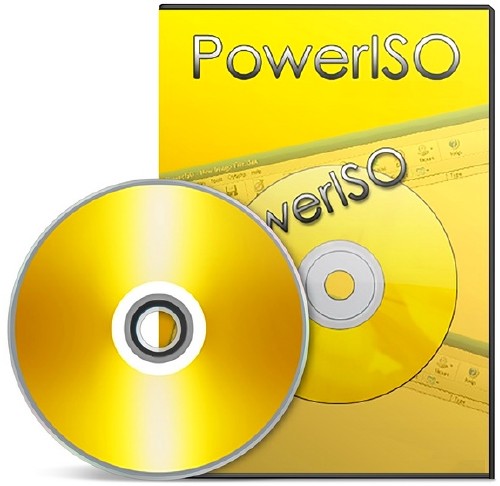
PowerISO is a powerful image processing and file compression tool, which allows you to create, extract, compress, edit and convert ISO/BIN image files, and mount these files with internal virtual drive. And most of all, the compressed files can be used directly without decompressing. 

It can process almost all CD / DVD / BD image files including ISO and BIN files. PowerISO provides an all-in-one solution. You can do every thing with your ISO files and disc image files. PowerISO support almost all CD/DVD-ROM image file formats (ISO, BIN, NRG, IMG, DAA and so on). Note: DAA (Direct-Access-Archive) is an advanced format for image file, which supports some advanced features, such as compression, password protection, and splitting to multiple volumes. It can be handled directly just like other formats, such as ISO, BIN, …
PowerISO Main Features:
• Support ISO, BIN, NRG, IMG, DAA, …
• Open, Create, Edit, Extract ISO File…
• Compress, Encrypt, Split ISO File…
• Integrated with internal Virtual Drive…
• Supports on-the-fly burning.
Softexia Screenshot• Supports UDF image file.
• Create image file from hard disk files or CD/DVD-ROM.
• Edit an existing image file.
• Can edit and burn Audio CD image file.
• Extract files and folders from image file.
• Convert image files between ISO/BIN and other formats.
• Make bootable image file, get boot information from bootable image file.
• Make floppy disk image file.
• Optimize files to save disk space while saving image files.
• Mount image file with internal virtual drive. Even if the image file is saved as DAA format, the virtual drive can handle that format directly.
• Support shell integration, such as context menu, Drag and Drop, clipboard…
• Supports command-line parameters.
• Can open XBOX image file.
• Supports multiple languages
What’s New in Version 6.2:
+ Remember UI settings on restart.
* Improve BDXL disc burning.
* Some minor bug fixes and enhancements.
Download | PowerISO 6.2 Retail DC 08.04.2015 Multilingual (x86/x64)

FreeFileSync 6.15 Final portable

FreeFileSync is a free, open source folder comparison and synchronization software for Windows, Linux and Mac OS X. It also works on 64bit operating systems on all platforms. The program can be installed in two versions: as a standard installer on Windows or as a portable application (no registry entries). Powered by a clean, easy, intuitive interface, this tool offers a myriad of features for synchronization purposes.

Features
•Detect moved and renamed files and folders
•Copy locked files (Volume Shadow Copy Service)
•Detect conflicts and propagate deletions
•Binary file comparison
•Full support for Symbolic Links
•Automate sync as a batch job
•Process multiple folder pairs
•Comprehensive and detailed error reporting
•Copy NTFS extended attributes (compressed, encrypted, sparse)
•Copy NTFS security permissions
•Support long path names > 260 characters
•Fail-safe file copy
•Cross-platform: Windows/Linux
•Expand environment variables like %USERPROFILE%
•Access variable drive letters by volume name (USB sticks)
•Native 64-bit support
•Keep versions of deleted/updated files
•Optimal sync sequence prevents disc space bottlenecks
•Full Unicode support
•Highly optimized performance
•Include/exclude files via filter
•Local and portable installation
•Handle daylight saving time changes on FAT/FAT32
•Use macros %time%, %date%, et al. for recurring backups
•Case sensitive synchronization
•Built-in locking serializes multiple jobs running against the same network share
Whats New:
FreeFileSync 6.15
——————————
Revert to log file naming convention without colon character
Prevent endless recursion when traversing into folder on corrupt file system
Fixed view filter button rendering issue for RTL languages
Fixed grid losing far scroll positions when increasing icon sizes
Flush file buffers before verifying file copy
Update existing items when retrying failed folder traversal
Harmonized bitmap file loading by removing format variance
Fixed invalid argument error when setting file times (Linux)
Fixed application hang when loading icon for named pipe (Linux)
Improved file copy read-ahead performance (Linux)
Use native file I/O for stream operations (Linux, OS X)
Fixed file copy creating zero-sized files (OS X)
Automatically create Minidump files during an application crash (Windows)
Check for missing service pack to help diagnose crash (Windows 7)
New menu item with download link after a version update
Work around C-function memory race condition when formatting time
Added Hindi language
Download | FreeFileSync 6.15 Final portable

MaxTo 2015.03.1 Multilingual

MaxTo is a window manager that allows you to define screen regions that windows automatically maximize to, for pixel-perfect window arrangements. Make the most of your screen estate. Quickly move windows using hotkeys. Thanks to MaxTo you can get more from your computer screen.

Download | MaxTo 2015.03.1 Multilingual

Hash Kracker 3.0 Final + portable

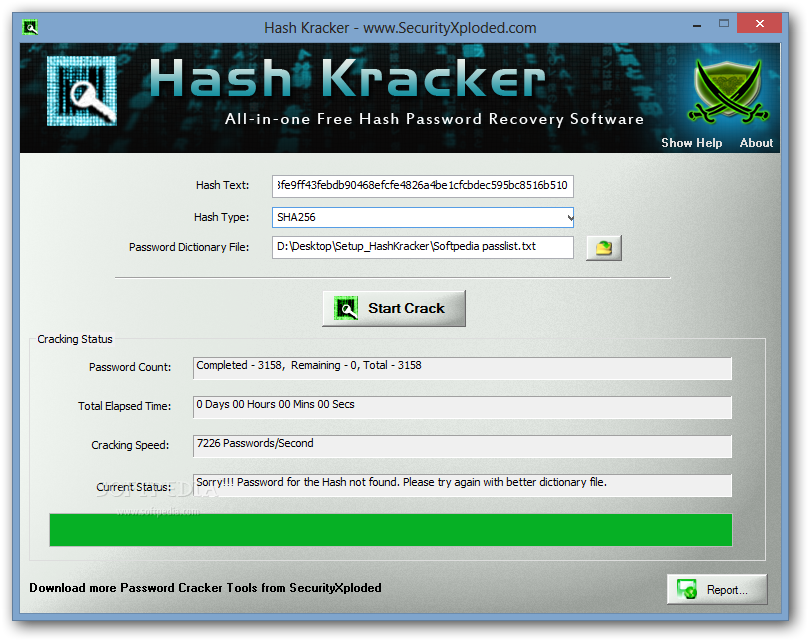
Hash Kracker is a handy and reliable utility designed to recover hash passwords from hash texts via various decryption algorithms.Hash Kracker features support for the following hash types: SHA1, SHA256, SHA384, SHA512 and MD5. It also generates a report in HTML or text format.

Features
Supports popular hash types such as MD5, SHA1, SHA256, SHA384, SHA512.
Automatically detects the Hash Type
Displays detailed statistics during Cracking operation
Stop the password cracking operation any time.
Auto copy the recovered Hash password to clipboard
Generate Hash Password Recovery report in HTML/XML/TEXT format.
Whats New:
Version 3.0: 9th Apr 2015
Integrated Uninstaller into Windows Add/Remove Programs, now you can uninstall it in a standard way.
Download | Hash Kracker 3.0 Final + portable

Winaero Tweaker 0.2.2.0 portable

Winaero Tweaker – universal tweaker software which supports Windows 7, Windows 8, Windows 8.1 and the upcoming Windows 10.

Note: the set of available options will depend on the operating system version you are running.
Winaero Tweaker features the following set of options (and this is only the beginning as more will be added over time):
Special Windows 10 tweaks:
Change Windows Update behavior which is locked to “Install updates automatically” in Windows 10 Technical Preview.
Enable the secret hidden experimental Date & Time pane which is not enabled by default in Windows 10 Technical Preview.
Enable the secret hidden experimental Login Screen which is not enabled by default in Windows 10 Technical Preview.
Here you can switch between the old resizable Start menu and the new “Continuum” Start menu in Windows 10 Technical Preview.
Appearance options:
Aero Colors
These options are inherited from my famous AeroTuner application and available for Windows 7, Windows 8 and Windows 8.1. It allows changing many Aero related hidden secret parameters in Windows 7. You can also sync the Aero color and the Start screen color in Windows 8 and Windows 8.1. In Windows 8, it also includes “Enable Window Colorization” and “High Contrast Mode” hidden settings.
Customize Shortcut Arrow
Customize or remove the shortcut overlay icon in Explorer. This will restart Explorer automatically.
Customize Window Borders
Customize the size of the window frame. You can reduce or enlarge it.
Slow down window animations
When enabled, you can slow down window animations by pressing and holding the Shift key. This is the the animation you see when minimizing, maximizing or closing a window.
Sync Metro/Aero Color (Windows 8/Windows 8.1)
Apply the color of the Start Screen to window borders and vice versa.
Operating system behaviour options:
Disable “Look for an app in the Store” Notification(Windows 8/Windows 8.1)
Disable “Look for an app in the Store” option when an unknown file type is opened. When disabled, Windows will only show a dialog with apps installed on your PC.
Disable Aero Shake
The Aero Shake feature minimizes all other background windows when you shake the active window. Here you can disable or enable it.
Disable Aero Snap
Disable the window snapping behavior, that is, the resizing and repositioning of a window that happens when you drag it and touch the pointer to the left, top or right edges of the screen.
Disable New Apps Notification(Windows 8/Windows 8.1)
Enable or disable the notification “You have new apps that can open this type of file” for newly installed apps.
Boot and Logon options:
Disable Lock Screen (Windows 8/Windows 8.1)
Here you can disable the Lock Screen if you do not want it or need it.
Don’t display last login user name
When enabled, Windows will not display the last user that successfully signed in on the Login screen.
Enable CTRL + ALT + DEL logon requirement
Enable or disable the CTRL + ALT + DELETE sequence for logging on in Windows. This can require users to press CTRL+ALT+DELETE before logging on.
Verbose Logon Messages
Enable or disable verbose sign-in status messages. Verbose status messages may be helpful when you are troubleshooting slow startup, shutdown, logon, or logoff behavior.
User accounts:
Disable or Enable UAC
Enable or disable User Account Control (UAC) confirmations and prompts. Disabling UAC is not secure, but it makes Windows less annoying.
Enable Built-in Administrator
The default account named “Administrator” remains disabled and hidden since Windows Vista. Here you can enable or disable the built-in Administrator account.
Pinning options (Windows 8/Windows 8.1):
Enable “Pin To Start” for all files
Enable or disable the “Pin To Start” context menu command for all files and folders.
Network options:
Enable Network Drives over UAC
Enable access to mapped Network Drives from elevated apps. By default it is turned off, so any elevated app can’t access your mapped network drive.
Enable TCP/IP Router
Enable or disable Transmission Control Protocol/Internet Protocol (TCP/IP) forwarding to use with apps like OpenVPN. By default, TCP/IP forwarding is not enabled in Windows OS.
System information
View information about your PC hardware and OS including WEI score.
Download | Winaero Tweaker 0.2.2.0 portable

CoolUtils Total Image Converter 5.1.70

Total Image Converter allows you to take an image and create a new one with a different size or format, or perform the task for huge batches of graphic files with one click. It is invaluable for web designers and other IT professionals. Total Image Conver 

Here are some key features of “Total Image Converter”:
· All image formats
· Total Image Converter supports almost all image formats (see the list ->). It’s all-in-one solution for those who do not want to waste time and effort searching for 10 different converters to deal with different formats.
· Batch conversion
· If you have hundreds of images to be converted, you can use its batch file convert option. Just check the files that you want to process or just press Select All button to save your time. Get any amount of image files converted or resized in one click!
· 3 ways of handling
· First, there is well-thought user interface. Second, Total Image Converter seamlessly integrates into Windows. That means that you may select the file in your desktop and make right-button mouse click. You will see ConvertTo item in the standart Windows popup menu. And there is also Command line support. Run Total Image Converter from the command line within other programs.
· Built-in viewer and thumbnails
· Total Image Converter has built-in viewer. You may easily view your images inside the program before or after the conversion. You can either work with detailed list of files (name, size, type, modify, attributes) or with their thumbnails.
· Resize, rotate, crop, mirror
· With Total Image Converter you can also resize, crop, rotate or mirror images and change the color resolution (include convert to black and white color) of your graphics. Besides, you may adjust White Balance and make gamma correction. Adjust or set Brightness, Contrast or Saturation, apply shadow or use some filter. All this done when converting your image with Total Image Converter!
· Watermarking
· Total Image Converter lets you apply watermarks to your images! You may add your comment, logo or date to a single photo or a bunch of them.
· No special knowledge required
· Even if you never dealt with image converters before you will master the program in seconds. The program will itself ask you all the questions about the conversion settings and in case you are at a loss it will advise you the best setting for each conversion. Click here to make a quick tour on the program and see how simple it is to use it.
Whats New:
Updates: official site does not provide any info about changes in this version
Download | CoolUtils Total Image Converter 5.1.70

ComboFix v15.4.9.1 Portable

ComboFix is a program, created by sUBs, that scans your computer for known malware, and when found, attempts to clean these infections automatically. In addition to being able to remove a large amount of the most common and current malware, ComboFix also displays a report that can be used by trained helpers to remove malware that is not automatically removed by the program.
How To Use ComboFix:
Disable or Close all anti-spyware, anti-malware antivirus real-time protection, which may affect ComboFix.
Download the latest official version of ComboFix (4mb) save to you desktop
Close all programs of you computer
Double click ComboFix.exe on you desktop
When ComboFix finished, it will create logs for you.
What’s New in This Release:
Official site does not provide any info about changes in this version
Download | ComboFix v15.4.9.1 Portable

Android Device Manager v1.4.4 Final

Ever misplaced or lost your phone? Android Device Manager locates lost devices and helps you keep your device and the data inside it, safe and secure. Android Device Manager lets you: Locate Android devices associated with your Google account, Reset your device’s screen lock PIN, Erase all data on the phone.

WHAT’S NEW
● Option to set a ‘call me back’ phone number to recover a lost device
● Bug fixes and performance improvements
Requires Android: 2.3 and up
Download | Android Device Manager v1.4.4 Final

Galaxy Charging Current Pro v2.01

Check if your device battery is charging correctly and at the maximum speed With this application you can check the battery charging electrical current of your Samsung Galaxy devices.

Galaxy Charging Current can also display a persistent notification that allows you to see the current directly on the notification area, while your device is charging. You can even set the app to show an alert if the charging current gets too low!
Compatibility list:
– International Samsung Galaxy S III (GT-I9300 and GT-I9305).
– South Korean Samsung Galaxy S III (SHV-E210K/L/S).
– International Samsung Galaxy Note II (GT-N7105).
– South Korean Samsung Galaxy Note II (SHV-E250S)
– Verizon Samsung Galaxy Note II (SCH-i605).
– Most Galaxy S4 models.
– Most Galaxy Note 3 models (reported by users).
– Most Galaxy S5 models (reported by users).
It may also work on other devices, but such is not guaranteed.
The application *may* not work on the following devices:
– Galaxy Note 4 with Qualcomm processor.
– Galaxy S3 Mini.
– Sprint S3 and Note 2.
– Verizon S3 and Note 2.
– Any device older than the Samsung Galaxy S3 (Galaxy Note 1, Galaxy S2, …).
What’s New
– Material design update!
– New info: battery state and temperature! Tap on the temperature to change unit (C/F).
v 2.01:
– Widget configuration activity bugfix.
Requires Android: 4.0 and up
Download | Galaxy Charging Current Pro v2.01

File Manager Premium v1.5.4 Final

File Manager is a Material/Holo-themed file manager and application explorer crafted for Android phones and tablets, with Google Drive and Dropbox integration.
With Clean File Manager you can easily find, browse, move, compress, and otherwise organize all of your files and apps On-The-Go!
Features include:
• Google Drive and Dropbox cloud storage integration
• Material/Holo Light and Material/Holo Dark themes for Android
• Intuitive left/right swiping to browse folders and files
• Explore you local Android file system, primary and secondary SD cards
• Multiple selection to operate on more than one files or folders
• Search and share files
• Application manager for your installed Android apps and games
• List view in the files and apps explorer
• Custom bookmarks
• Optimized for both phones and tablets (HD) screens (tested with Nexus devices)
• Support USB OTG On-The-Go (tested on Samsung Galaxy Note II, Samsung Galaxy S4, Motorola Moto G2 and HTC One)
• Compress and extract support for Zip files
• Extract support for: Rar, Tar, Tar.gz, Tgz, Tar.bz2, Tbz
• Sorting options (per-folder sorting can be enabled from settings)
• Cut, copy, paste, delete, rename, move (for both files and folders)
• Create and delete folders (directories)
• Thumbnail for photos and application Apk files
• Pick ringtones
• Built-in image gallery (can be disabled from settings)
• Compatible with Android 4.4 KitKat, Android 5.0 Lollipop and latest Nexus 7 and Nexus 9 tablets
What’s New
• Bug fixes
Requirements: 2.2+
Download | File Manager Premium v1.5.4 Final

IceCream Screen Recorder 1.39 Multilingual Portable

IceCream Screen Recorder is a flexible and useful application that can help you to quickly record a certainarea of your screen or capture snapshot anytime you need.
Area selection
Select the area of your screen that you’d like to take a screenshot of or make a video in a single click.
Drawing panel
Draw, outline, and add arrows or text to your screenshot or video while capturing.
Project History
Fast access to all captured videos and screenshots.
What else makes Icecream Screen Recorder so special?
Audio settings
Change the volume of your microphone and system sounds.
Clipboard
Save screenshots to the clipboard and share them via Skype or e-mail instantly.
Settings
Hide cursor or desktop icons, and disable screensaver if necessary.
Screenshot to URL
Send screenshots to Icecream Apps server in a single click, get a short URL, and share it with anyone.
What’s New :
Turkish language added 

Download | IceCream Screen Recorder 1.39 Multilingual Portable

Android Apps – ODay – 08-Apr-2015

Ampere Pro v1.41.apkCalendar Events Notifier PREMIUM v3.4.181.apkCall Master for Root Users full v1.8.3.2.B27 LIC.apkCall Master for Root Users full v1.8.3.2.B27.apkCamera FV-5 v2.5 + Original.apkCamera FV-5 v2.5 + Patched.apkColour Madness v1.3.apkDungeoneer v1.0 Mod Gold.apkDungeoneer v1.0.apkForge of Gods GOLD (RPG) v2.53 [Mod Money].apkFotor Photo Editor v3.1.0.133 Unlocked.apkHill Climb Racing v1.22.0 (Infinite Coins].apkHydro Coach – drink water PRO v2.8.3.apkNova Launcher Prime v#materinova.27.apkPersist + Volume Control v3.55.apkPure Calendar widget (agenda) v3.4.8.apkPure Grid calendar widget_2.7.0.apkRandom Mahjong v1.3.5 [Ad-Free].apkScramble With Friends v7.17.apkSD Maid Pro – System Cleaning Tool v3.1.2.7 (Patched Proper).apkTap Titans v2.1.6 (Mod Money).apkTap Titans v2.1.6 (Mod Money)-OBB.rarUltra GPS Logger v3.105d Original.apkUltra GPS Logger v3.105d Patched.apkVirtual Families 2 v1.5.0.49 (Unlimited Gold).apkVirtual Families 2 v1.5.0.49 (Unlimited Gold)-OBB.rarWiFi Manager Premium v3.5.4.2.apkYoWindow Weather v1.6.7.apk

================
[INSTALL NOTES] 
================
Step 1: Unpack
Step 2: Isntall to device (some Apps need “Root”)
Step 3: Enjoy
Download | Android Apps – ODay – 08-Apr-2015 Part 1
Download | Android Apps – ODay – 08-Apr-2015 Part 2
Download | Android Apps – ODay – 08-Apr-2015
 Part 3

Adobe Photoshop Illustrator CS6 Portable

In the setup you have

Adobe Photoshop CS6 Portable x86
Adobe Photoshop CS6 Portable x64
Adobe Illustrator CS6 Portable
+ 2 plugins for Illustrator (CameraProfiles & LensProfiles)
Just setup and use.
by Simple Setup
Download | Adobe Photoshop Illustrator CS6 Portable

Steinberg Cubase Elements v8.0.10 (Mac OS X) Full Version

Cubase Elements 8 is your personal music studio, incorporating professional workflows as used by countless professional artists around the globe. Using the same technology platform as its larger siblings in the Cubase family, Cubase Elements 8 offers tools for intuitive song-writing, instruments to develop your musical ideas and studio-grade effects.

Cubase Elements Key Features
Personal music production system, offering a set of streamlined audio/MIDI recording, editing, scoring and mixing tools
Based on proven Steinberg Cubase technology used by professionals around the world
Supports 64 MIDI and 48 simultaneous audio tracks with up to 24-bit/192 kHz
Award-winning 32-bit floating-point Steinberg audio engine, flexible routing and full automatic delay compensation
Includes outstanding virtual instruments: HALion Sonic SE workstation, MPC-style Groove Agent SE drum machine, Prologue synthesizer
Comes ready with 44 audio effect processors, including Pitch Correct for vocal intonation correction, MorphFilter and the extraordinary VST Amp Rack guitar tone suite
MixConsole provides the stellar mixing experience with full flexibility and integrated EQ/Dynamics channel strip modules for epic pro-console sound
Chord track and chord pads for easy chord composing and management
Includes dozens of presets and thousands of MIDI construction loops
Streamlined score editing feature set
Download | Steinberg Cubase Elements v8.0.10 (Mac OS X) Part 1
Download | Steinberg Cubase Elements v8.0.10 (Mac OS X) Part 2
Download | Steinberg Cubase Elements v8.0.10 (Mac OS X) Part 3
Download | Steinberg Cubase Elements v8.0.10 (Mac OS X) Part 4
Download | Steinberg Cubase Elements v8.0.10 (Mac OS X) Part 5

Hydro Coach – drink water PRO v2.8.3 [Unlocked]

Overview: To drink water regularly is a big challenge in the day-to-day life. Hands up – who is really drinking enough water every day?

Hydro Coach will help you by calculating how much water you need, tracking what you drink and gently reminding you when to drink. It’s time to unleash the power of water to raise up your fitness. Because your fitness is worth it!
Benefits of drinking water for your fitness:
* It’s an effective method of combating stress and tiredness
* Drinking enough water can clear up your skin
* Drinking enough water can raise up your fitness in a few days
* It’s beneficial to weight loss and the basic of every professional diet
* Drinking more water can relieve headaches
Key features:
* Increase your fitness with personal drink notifications
* Keep a perfect track of your water balance through a simple designed diary
* Get a graphical insight into your water drink habit with week and month statistics
* Practical widgets provide clear information about your water intake
* Create custom drink volumes easily
* Supports imperial (fl. oz.) and Metric (ml) units
* Share your water intake with your friends
* Direct water input through your android wear
* Synchronization with your google account
How does it work?
Our formula calculates your ideal personal water requirement based on multiple factors like age, weight, gender and lifestyle. Select your favorite glass you are normally using and Hydro Coach will remind you to drink and refill it.
WHAT’S NEW
Your feedback is incredible valuable to us. Feel free to contact us on Facebook or Google+.
v2.8
* Translations added
v2.7
* Permissions updated
v2.6
* An unique notification sound
* Data export (CSV) for PRO users
* Possibilty to disable tips in notifications
* Bugfix: Daily target for past days
v2.0
* Adaptation to Material Design
* Additional statistics
* Earn Achievements with Play Games Service
* Every notification includes a tip
* Hide ads for little money
* Many translations
PRO features Unlocked
This app has no advertisements
Requirements: 3.1 and up
Download | Hydro Coach – drink water PRO v2.8.3 [Unlocked]

Amber Weather Premium 1.3.3

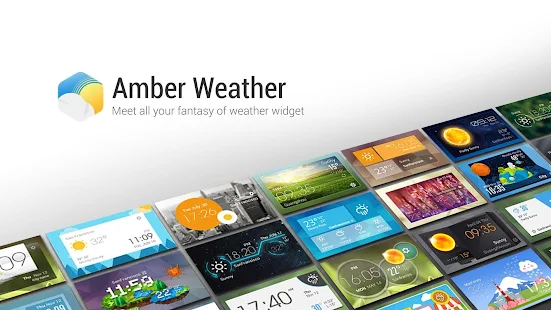
EZ Weather has a simple, clean and beautiful HOLO interface. It’s designed for easy using . You can get weather conditions quickly including daily and hourly forecasts for any location. Your best weather app on home screen!

TESTIMONIALS
“EZ Weather is, in my opinion, the best looking app on show….EZ Weather is actually an app of high quality. It displays weather data with a light-on-dark colour scheme, which makes for glorious clarity.”- Appstorm
“If you’re tired of your weather app and want something new, EZ Weather HD is definitely an app to try!”-Androidtapp
“A clean simple weather app. Great app: Great widgets: Great notification weather. Can’t ask for much more!
”-Androiddissected
“A simple and easy to use weather app. Currently ad-free, so get while the getting’s good.”-Bestappsmarket
FEATURES
– Transparent weather widget
– Daily and hourly weather report ( 7 days and 24 hours), current detail conditions
– Intuitive information of temperature, wind speed and direction, humidity, visibility, pressure, dew point, UV etc.
– Auto-location,updated with your position
– Multi weather data source service.
– Smart Alert when weather changed, support push notification to your android wear device.
– Support new feature on Android L and Android wear.
– Support show current and future weather in expandable notification bar.
– Support clock & weather, forecast and current weather info widget for tablet and phone.
– Support Lock Screen Widget and DashClock extension.
– Quick-Action:You could open clock, calendar, weather, widget settings, or any other app by click different area in widget
– Support tens of thousands cities’s climate around the world, also support world clock take it when you are traveling!
– Support Arabic, Catalan ,Chinese ,Croatian ,Czech ,Danish ,Dutch ,English French ,German ,Greek ,Hebrew ,Hungarian ,Italian ,Japanese ,Korean ,Norway ,Polish ,Portuguese(Brazil) , Portuguese(Portugal), Romanian, Russian, Serbian, Slovakia, Spanish, Swedish, Turkish, Ukrainian, Vietnamese etc.
– Support new feature on KitKat 4.4 – Full-screen immersive mode
Requires Android: Varies with device
Whats New :
# Fix FC bug in live wallpaper setting
Download | Amber Weather Premium 1.3.3

Twitter Delicious Facebook Digg Stumbleupon Favorites More