Tampilkan postingan dengan label Android. Tampilkan semua postingan

Kamis, 09 April 2015

Android Device Manager v1.4.4 Final

Ever misplaced or lost your phone? Android Device Manager locates lost devices and helps you keep your device and the data inside it, safe and secure. Android Device Manager lets you: Locate Android devices associated with your Google account, Reset your device’s screen lock PIN, Erase all data on the phone.

WHAT’S NEW
● Option to set a ‘call me back’ phone number to recover a lost device
● Bug fixes and performance improvements
Requires Android: 2.3 and up
Download | Android Device Manager v1.4.4 Final

Galaxy Charging Current Pro v2.01

Check if your device battery is charging correctly and at the maximum speed With this application you can check the battery charging electrical current of your Samsung Galaxy devices.

Galaxy Charging Current can also display a persistent notification that allows you to see the current directly on the notification area, while your device is charging. You can even set the app to show an alert if the charging current gets too low!
Compatibility list:
– International Samsung Galaxy S III (GT-I9300 and GT-I9305).
– South Korean Samsung Galaxy S III (SHV-E210K/L/S).
– International Samsung Galaxy Note II (GT-N7105).
– South Korean Samsung Galaxy Note II (SHV-E250S)
– Verizon Samsung Galaxy Note II (SCH-i605).
– Most Galaxy S4 models.
– Most Galaxy Note 3 models (reported by users).
– Most Galaxy S5 models (reported by users).
It may also work on other devices, but such is not guaranteed.
The application *may* not work on the following devices:
– Galaxy Note 4 with Qualcomm processor.
– Galaxy S3 Mini.
– Sprint S3 and Note 2.
– Verizon S3 and Note 2.
– Any device older than the Samsung Galaxy S3 (Galaxy Note 1, Galaxy S2, …).
What’s New
– Material design update!
– New info: battery state and temperature! Tap on the temperature to change unit (C/F).
v 2.01:
– Widget configuration activity bugfix.
Requires Android: 4.0 and up
Download | Galaxy Charging Current Pro v2.01

File Manager Premium v1.5.4 Final

File Manager is a Material/Holo-themed file manager and application explorer crafted for Android phones and tablets, with Google Drive and Dropbox integration.
With Clean File Manager you can easily find, browse, move, compress, and otherwise organize all of your files and apps On-The-Go!
Features include:
• Google Drive and Dropbox cloud storage integration
• Material/Holo Light and Material/Holo Dark themes for Android
• Intuitive left/right swiping to browse folders and files
• Explore you local Android file system, primary and secondary SD cards
• Multiple selection to operate on more than one files or folders
• Search and share files
• Application manager for your installed Android apps and games
• List view in the files and apps explorer
• Custom bookmarks
• Optimized for both phones and tablets (HD) screens (tested with Nexus devices)
• Support USB OTG On-The-Go (tested on Samsung Galaxy Note II, Samsung Galaxy S4, Motorola Moto G2 and HTC One)
• Compress and extract support for Zip files
• Extract support for: Rar, Tar, Tar.gz, Tgz, Tar.bz2, Tbz
• Sorting options (per-folder sorting can be enabled from settings)
• Cut, copy, paste, delete, rename, move (for both files and folders)
• Create and delete folders (directories)
• Thumbnail for photos and application Apk files
• Pick ringtones
• Built-in image gallery (can be disabled from settings)
• Compatible with Android 4.4 KitKat, Android 5.0 Lollipop and latest Nexus 7 and Nexus 9 tablets
What’s New
• Bug fixes
Requirements: 2.2+
Download | File Manager Premium v1.5.4 Final

Android Apps – ODay – 08-Apr-2015

Ampere Pro v1.41.apkCalendar Events Notifier PREMIUM v3.4.181.apkCall Master for Root Users full v1.8.3.2.B27 LIC.apkCall Master for Root Users full v1.8.3.2.B27.apkCamera FV-5 v2.5 + Original.apkCamera FV-5 v2.5 + Patched.apkColour Madness v1.3.apkDungeoneer v1.0 Mod Gold.apkDungeoneer v1.0.apkForge of Gods GOLD (RPG) v2.53 [Mod Money].apkFotor Photo Editor v3.1.0.133 Unlocked.apkHill Climb Racing v1.22.0 (Infinite Coins].apkHydro Coach – drink water PRO v2.8.3.apkNova Launcher Prime v#materinova.27.apkPersist + Volume Control v3.55.apkPure Calendar widget (agenda) v3.4.8.apkPure Grid calendar widget_2.7.0.apkRandom Mahjong v1.3.5 [Ad-Free].apkScramble With Friends v7.17.apkSD Maid Pro – System Cleaning Tool v3.1.2.7 (Patched Proper).apkTap Titans v2.1.6 (Mod Money).apkTap Titans v2.1.6 (Mod Money)-OBB.rarUltra GPS Logger v3.105d Original.apkUltra GPS Logger v3.105d Patched.apkVirtual Families 2 v1.5.0.49 (Unlimited Gold).apkVirtual Families 2 v1.5.0.49 (Unlimited Gold)-OBB.rarWiFi Manager Premium v3.5.4.2.apkYoWindow Weather v1.6.7.apk

================
[INSTALL NOTES] 
================
Step 1: Unpack
Step 2: Isntall to device (some Apps need “Root”)
Step 3: Enjoy
Download | Android Apps – ODay – 08-Apr-2015 Part 1
Download Android Apps – ODay – 08-Apr-2015 Part 2
Download Android Apps – ODay – 08-Apr-2015
 Part 3

Hydro Coach – drink water PRO v2.8.3 [Unlocked]

Overview: To drink water regularly is a big challenge in the day-to-day life. Hands up – who is really drinking enough water every day?

Hydro Coach will help you by calculating how much water you need, tracking what you drink and gently reminding you when to drink. It’s time to unleash the power of water to raise up your fitness. Because your fitness is worth it!
Benefits of drinking water for your fitness:
* It’s an effective method of combating stress and tiredness
* Drinking enough water can clear up your skin
* Drinking enough water can raise up your fitness in a few days
* It’s beneficial to weight loss and the basic of every professional diet
* Drinking more water can relieve headaches
Key features:
* Increase your fitness with personal drink notifications
* Keep a perfect track of your water balance through a simple designed diary
* Get a graphical insight into your water drink habit with week and month statistics
* Practical widgets provide clear information about your water intake
* Create custom drink volumes easily
* Supports imperial (fl. oz.) and Metric (ml) units
* Share your water intake with your friends
* Direct water input through your android wear
* Synchronization with your google account
How does it work?
Our formula calculates your ideal personal water requirement based on multiple factors like age, weight, gender and lifestyle. Select your favorite glass you are normally using and Hydro Coach will remind you to drink and refill it.
WHAT’S NEW
Your feedback is incredible valuable to us. Feel free to contact us on Facebook or Google+.
v2.8
* Translations added
v2.7
* Permissions updated
v2.6
* An unique notification sound
* Data export (CSV) for PRO users
* Possibilty to disable tips in notifications
* Bugfix: Daily target for past days
v2.0
* Adaptation to Material Design
* Additional statistics
* Earn Achievements with Play Games Service
* Every notification includes a tip
* Hide ads for little money
* Many translations
PRO features Unlocked
This app has no advertisements
Requirements: 3.1 and up
Download | Hydro Coach – drink water PRO v2.8.3 [Unlocked]

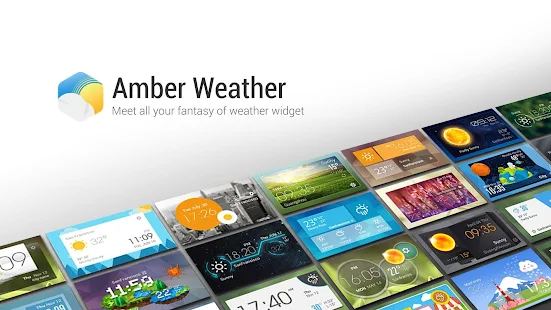
Amber Weather Premium 1.3.3

EZ Weather has a simple, clean and beautiful HOLO interface. It’s designed for easy using . You can get weather conditions quickly including daily and hourly forecasts for any location. Your best weather app on home screen!

TESTIMONIALS
“EZ Weather is, in my opinion, the best looking app on show….EZ Weather is actually an app of high quality. It displays weather data with a light-on-dark colour scheme, which makes for glorious clarity.”- Appstorm
“If you’re tired of your weather app and want something new, EZ Weather HD is definitely an app to try!”-Androidtapp
“A clean simple weather app. Great app: Great widgets: Great notification weather. Can’t ask for much more!
”-Androiddissected
“A simple and easy to use weather app. Currently ad-free, so get while the getting’s good.”-Bestappsmarket
FEATURES
– Transparent weather widget
– Daily and hourly weather report ( 7 days and 24 hours), current detail conditions
– Intuitive information of temperature, wind speed and direction, humidity, visibility, pressure, dew point, UV etc.
– Auto-location,updated with your position
– Multi weather data source service.
– Smart Alert when weather changed, support push notification to your android wear device.
– Support new feature on Android L and Android wear.
– Support show current and future weather in expandable notification bar.
– Support clock & weather, forecast and current weather info widget for tablet and phone.
– Support Lock Screen Widget and DashClock extension.
– Quick-Action:You could open clock, calendar, weather, widget settings, or any other app by click different area in widget
– Support tens of thousands cities’s climate around the world, also support world clock take it when you are traveling!
– Support Arabic, Catalan ,Chinese ,Croatian ,Czech ,Danish ,Dutch ,English French ,German ,Greek ,Hebrew ,Hungarian ,Italian ,Japanese ,Korean ,Norway ,Polish ,Portuguese(Brazil) , Portuguese(Portugal), Romanian, Russian, Serbian, Slovakia, Spanish, Swedish, Turkish, Ukrainian, Vietnamese etc.
– Support new feature on KitKat 4.4 – Full-screen immersive mode
Requires Android: Varies with device
Whats New :
# Fix FC bug in live wallpaper setting
Download | Amber Weather Premium 1.3.3

Selasa, 07 April 2015

AutoCAD 360 Pro Plus v3.0.9 Final

AutoCAD 360 is a easy-to-use drawing and drafting mobile app that allows you to view, edit, and share AutoCAD drawings anytime, anywhere. Simplify site visits and fieldwork with powerful design review and markup tools—available online and offline. Seamlessly share drawings with others across desktop, web, and mobile devices. Easily access drawings from web browsers using the free companion AutoCAD 360 web app. AutoCAD 360 Pro subscription plans further expand the functionality of the app, bringing additional capabilities to the field.
View
• Open 2D and 3D DWG drawings uploaded to your free* AutoCAD 360 online account
• Work offline, then easily upload changes when you are back online
• Upload and open files directly from email on your device
• See all aspects of your DWG file, including external references, layers, and image underlays
• Use multi-touch zoom and pan to easily navigate large drawings
• Use your device’s GPS to orient yourself within a drawing
Edit
• Draw and edit shapes with accuracy using Snap
• Select, move, rotate, and scale objects
• Add and edit text annotations directly on your drawing; no need for paper mark-ups
• Validate distance measurements in the drawing while you are onsite
• Save edits to your AutoCAD 360 online workspace, so your drawings stay up to date
Share
• Share your designs with others directly from the mobile app
• Add comments and images and invite responses using the Design Feed
• Print remotely from your mobile device using HP’s ePrint & Share service
• Plot your designs to PDF or DWF and share them via email
AutoCAD 360 Pro subscription plans allow you to get much more out of the app, enabling:
• New drawing creation
• Larger file size support
• Connectivity to third-party storage, including Dropbox, Box, and more
• Advanced layer management
• Properties and attributes
• Block libraries
• Drawing coordinates
• Priority support
• Increased storage space
• New tools and much more
What’s new
What’s new? Well, everything is! Over the last few months our team worked hard on improving the experience in our app, making it look more modern and friendlier to use. We collected all the feedback that you gave us over the last 4 years, we designed, built and tested, designed again and asked for feedback from some of you on the stuff we did, and now we’re ready to release all the work we did to the world.
Requires Android: 2.3 and up
Download | AutoCAD 360 Pro Plus v3.0.9 Final

Twitter Delicious Facebook Digg Stumbleupon Favorites More