Tampilkan postingan dengan label Software. Tampilkan semua postingan

Kamis, 09 April 2015

Tor Browser Bundle 4.0.7 portable

Tor is a toolset for a wide range of organizations and people that want to improve their safety and security on the Internet. Using Tor can help you anonymize web browsing and publishing, instant messaging, IRC, SSH, and other applications that use the TCP protocol. Tor also provides a platform on which software developers can build new applications with built-in anonymity, safety, and privacy features. The Tor Browser Bundle lets you use Tor on Windows, Mac OS X, or Linux without needing to install any software. It can run off a USB flash drive, comes with a pre-configured web browser to protect your anonymity, and is self-contained. 

Surfing anonymously provides a powerful shield against network surveillance and traffic analysis. Protecting your online privacy can only be achieved by additional software tools that can hide your location and can prevent your online information and browsing habits from being revealed to anyone.
If you’re ever in need of such a tool, Tor Browser Bundle is one suggestion you can add to the list. The application relies on a network of virtual servers in order to make your browsing sessions anonymous. Tor makes available a set of rules and algorithms that routes the communications through various servers all over the world. Thus, all the traffic is randomized so tracking the source becomes an almost impossible task.
The download package is a self-extracting archive that includes the Tor application itself, which can be run from command line, a cross platform controller GUI named Vidalia and a custom-made version of Firefox equipped with a set of addons that ensure online anonymity.
We advise the average user to consider using the Vidalia application, because the graphical interface puts you through a lesser ordeal than the command prompt version of Tor. When you first run Vidalia, it automatically connects to the Tor network and if the process is successful, a status will be displayed in the main window.
Vidalia’s interface encases a collection of shortcuts that allow you to stop the service, to start setting up the relays, to trigger a global view of the network and most important of all, it sports a button for using a new identity any time you wish. If you’re interested in bandwidth usage, Vidalia features a separate utility just for showing a bandwidth graph that measures the receive/send rate of the packets.
The portable Firefox version included in the download package is customized with a few extensions that make the anonymous surfing experience easier. These include: Torbutton – allows you to create a new identity each time you start a browsing session, NoScript – blocks scripts from untrusted domains and HTTPS Everywhere – enables you to encrypt the communication with a lot of popular sites.
With all the components it encases, Tor Browser Bundle is one of the most trustworthy anonymous surfing tools out there. It can be configured from command prompt, run from its dedicated GUI controller – Vidalia and comes with a pre-configured web browser. Whichever of these methods you choose the result is a safe and controlled Internet browsing experience.
Download | Tor Browser Bundle 4.0.7 portable
PowerISO 6.2 Retail DC 08.04.2015 Multilingual (x86/x64)

PowerISO is a powerful image processing and file compression tool, which allows you to create, extract, compress, edit and convert ISO/BIN image files, and mount these files with internal virtual drive. And most of all, the compressed files can be used directly without decompressing. 

It can process almost all CD / DVD / BD image files including ISO and BIN files. PowerISO provides an all-in-one solution. You can do every thing with your ISO files and disc image files. PowerISO support almost all CD/DVD-ROM image file formats (ISO, BIN, NRG, IMG, DAA and so on). Note: DAA (Direct-Access-Archive) is an advanced format for image file, which supports some advanced features, such as compression, password protection, and splitting to multiple volumes. It can be handled directly just like other formats, such as ISO, BIN, …
PowerISO Main Features:
• Support ISO, BIN, NRG, IMG, DAA, …
• Open, Create, Edit, Extract ISO File…
• Compress, Encrypt, Split ISO File…
• Integrated with internal Virtual Drive…
• Supports on-the-fly burning.
Softexia Screenshot• Supports UDF image file.
• Create image file from hard disk files or CD/DVD-ROM.
• Edit an existing image file.
• Can edit and burn Audio CD image file.
• Extract files and folders from image file.
• Convert image files between ISO/BIN and other formats.
• Make bootable image file, get boot information from bootable image file.
• Make floppy disk image file.
• Optimize files to save disk space while saving image files.
• Mount image file with internal virtual drive. Even if the image file is saved as DAA format, the virtual drive can handle that format directly.
• Support shell integration, such as context menu, Drag and Drop, clipboard…
• Supports command-line parameters.
• Can open XBOX image file.
• Supports multiple languages
What’s New in Version 6.2:
+ Remember UI settings on restart.
* Improve BDXL disc burning.
* Some minor bug fixes and enhancements.
Download | PowerISO 6.2 Retail DC 08.04.2015 Multilingual (x86/x64)

FreeFileSync 6.15 Final portable

FreeFileSync is a free, open source folder comparison and synchronization software for Windows, Linux and Mac OS X. It also works on 64bit operating systems on all platforms. The program can be installed in two versions: as a standard installer on Windows or as a portable application (no registry entries). Powered by a clean, easy, intuitive interface, this tool offers a myriad of features for synchronization purposes.

Features
•Detect moved and renamed files and folders
•Copy locked files (Volume Shadow Copy Service)
•Detect conflicts and propagate deletions
•Binary file comparison
•Full support for Symbolic Links
•Automate sync as a batch job
•Process multiple folder pairs
•Comprehensive and detailed error reporting
•Copy NTFS extended attributes (compressed, encrypted, sparse)
•Copy NTFS security permissions
•Support long path names > 260 characters
•Fail-safe file copy
•Cross-platform: Windows/Linux
•Expand environment variables like %USERPROFILE%
•Access variable drive letters by volume name (USB sticks)
•Native 64-bit support
•Keep versions of deleted/updated files
•Optimal sync sequence prevents disc space bottlenecks
•Full Unicode support
•Highly optimized performance
•Include/exclude files via filter
•Local and portable installation
•Handle daylight saving time changes on FAT/FAT32
•Use macros %time%, %date%, et al. for recurring backups
•Case sensitive synchronization
•Built-in locking serializes multiple jobs running against the same network share
Whats New:
FreeFileSync 6.15
——————————
Revert to log file naming convention without colon character
Prevent endless recursion when traversing into folder on corrupt file system
Fixed view filter button rendering issue for RTL languages
Fixed grid losing far scroll positions when increasing icon sizes
Flush file buffers before verifying file copy
Update existing items when retrying failed folder traversal
Harmonized bitmap file loading by removing format variance
Fixed invalid argument error when setting file times (Linux)
Fixed application hang when loading icon for named pipe (Linux)
Improved file copy read-ahead performance (Linux)
Use native file I/O for stream operations (Linux, OS X)
Fixed file copy creating zero-sized files (OS X)
Automatically create Minidump files during an application crash (Windows)
Check for missing service pack to help diagnose crash (Windows 7)
New menu item with download link after a version update
Work around C-function memory race condition when formatting time
Added Hindi language
Download | FreeFileSync 6.15 Final portable

MaxTo 2015.03.1 Multilingual

MaxTo is a window manager that allows you to define screen regions that windows automatically maximize to, for pixel-perfect window arrangements. Make the most of your screen estate. Quickly move windows using hotkeys. Thanks to MaxTo you can get more from your computer screen.

Download | MaxTo 2015.03.1 Multilingual

Hash Kracker 3.0 Final + portable

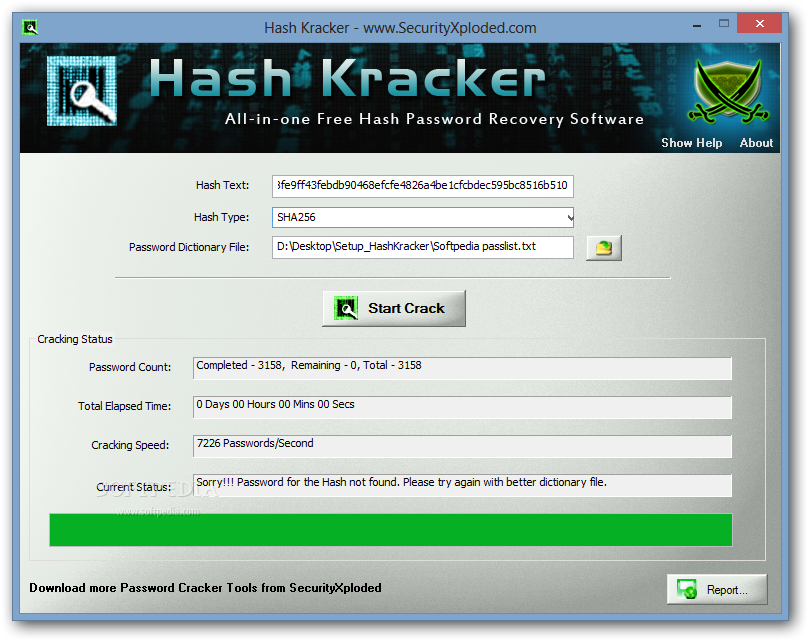
Hash Kracker is a handy and reliable utility designed to recover hash passwords from hash texts via various decryption algorithms.Hash Kracker features support for the following hash types: SHA1, SHA256, SHA384, SHA512 and MD5. It also generates a report in HTML or text format.

Features
Supports popular hash types such as MD5, SHA1, SHA256, SHA384, SHA512.
Automatically detects the Hash Type
Displays detailed statistics during Cracking operation
Stop the password cracking operation any time.
Auto copy the recovered Hash password to clipboard
Generate Hash Password Recovery report in HTML/XML/TEXT format.
Whats New:
Version 3.0: 9th Apr 2015
Integrated Uninstaller into Windows Add/Remove Programs, now you can uninstall it in a standard way.
Download | Hash Kracker 3.0 Final + portable

Winaero Tweaker 0.2.2.0 portable

Winaero Tweaker – universal tweaker software which supports Windows 7, Windows 8, Windows 8.1 and the upcoming Windows 10.

Note: the set of available options will depend on the operating system version you are running.
Winaero Tweaker features the following set of options (and this is only the beginning as more will be added over time):
Special Windows 10 tweaks:
Change Windows Update behavior which is locked to “Install updates automatically” in Windows 10 Technical Preview.
Enable the secret hidden experimental Date & Time pane which is not enabled by default in Windows 10 Technical Preview.
Enable the secret hidden experimental Login Screen which is not enabled by default in Windows 10 Technical Preview.
Here you can switch between the old resizable Start menu and the new “Continuum” Start menu in Windows 10 Technical Preview.
Appearance options:
Aero Colors
These options are inherited from my famous AeroTuner application and available for Windows 7, Windows 8 and Windows 8.1. It allows changing many Aero related hidden secret parameters in Windows 7. You can also sync the Aero color and the Start screen color in Windows 8 and Windows 8.1. In Windows 8, it also includes “Enable Window Colorization” and “High Contrast Mode” hidden settings.
Customize Shortcut Arrow
Customize or remove the shortcut overlay icon in Explorer. This will restart Explorer automatically.
Customize Window Borders
Customize the size of the window frame. You can reduce or enlarge it.
Slow down window animations
When enabled, you can slow down window animations by pressing and holding the Shift key. This is the the animation you see when minimizing, maximizing or closing a window.
Sync Metro/Aero Color (Windows 8/Windows 8.1)
Apply the color of the Start Screen to window borders and vice versa.
Operating system behaviour options:
Disable “Look for an app in the Store” Notification(Windows 8/Windows 8.1)
Disable “Look for an app in the Store” option when an unknown file type is opened. When disabled, Windows will only show a dialog with apps installed on your PC.
Disable Aero Shake
The Aero Shake feature minimizes all other background windows when you shake the active window. Here you can disable or enable it.
Disable Aero Snap
Disable the window snapping behavior, that is, the resizing and repositioning of a window that happens when you drag it and touch the pointer to the left, top or right edges of the screen.
Disable New Apps Notification(Windows 8/Windows 8.1)
Enable or disable the notification “You have new apps that can open this type of file” for newly installed apps.
Boot and Logon options:
Disable Lock Screen (Windows 8/Windows 8.1)
Here you can disable the Lock Screen if you do not want it or need it.
Don’t display last login user name
When enabled, Windows will not display the last user that successfully signed in on the Login screen.
Enable CTRL + ALT + DEL logon requirement
Enable or disable the CTRL + ALT + DELETE sequence for logging on in Windows. This can require users to press CTRL+ALT+DELETE before logging on.
Verbose Logon Messages
Enable or disable verbose sign-in status messages. Verbose status messages may be helpful when you are troubleshooting slow startup, shutdown, logon, or logoff behavior.
User accounts:
Disable or Enable UAC
Enable or disable User Account Control (UAC) confirmations and prompts. Disabling UAC is not secure, but it makes Windows less annoying.
Enable Built-in Administrator
The default account named “Administrator” remains disabled and hidden since Windows Vista. Here you can enable or disable the built-in Administrator account.
Pinning options (Windows 8/Windows 8.1):
Enable “Pin To Start” for all files
Enable or disable the “Pin To Start” context menu command for all files and folders.
Network options:
Enable Network Drives over UAC
Enable access to mapped Network Drives from elevated apps. By default it is turned off, so any elevated app can’t access your mapped network drive.
Enable TCP/IP Router
Enable or disable Transmission Control Protocol/Internet Protocol (TCP/IP) forwarding to use with apps like OpenVPN. By default, TCP/IP forwarding is not enabled in Windows OS.
System information
View information about your PC hardware and OS including WEI score.
Download | Winaero Tweaker 0.2.2.0 portable

CoolUtils Total Image Converter 5.1.70

Total Image Converter allows you to take an image and create a new one with a different size or format, or perform the task for huge batches of graphic files with one click. It is invaluable for web designers and other IT professionals. Total Image Conver 

Here are some key features of “Total Image Converter”:
· All image formats
· Total Image Converter supports almost all image formats (see the list ->). It’s all-in-one solution for those who do not want to waste time and effort searching for 10 different converters to deal with different formats.
· Batch conversion
· If you have hundreds of images to be converted, you can use its batch file convert option. Just check the files that you want to process or just press Select All button to save your time. Get any amount of image files converted or resized in one click!
· 3 ways of handling
· First, there is well-thought user interface. Second, Total Image Converter seamlessly integrates into Windows. That means that you may select the file in your desktop and make right-button mouse click. You will see ConvertTo item in the standart Windows popup menu. And there is also Command line support. Run Total Image Converter from the command line within other programs.
· Built-in viewer and thumbnails
· Total Image Converter has built-in viewer. You may easily view your images inside the program before or after the conversion. You can either work with detailed list of files (name, size, type, modify, attributes) or with their thumbnails.
· Resize, rotate, crop, mirror
· With Total Image Converter you can also resize, crop, rotate or mirror images and change the color resolution (include convert to black and white color) of your graphics. Besides, you may adjust White Balance and make gamma correction. Adjust or set Brightness, Contrast or Saturation, apply shadow or use some filter. All this done when converting your image with Total Image Converter!
· Watermarking
· Total Image Converter lets you apply watermarks to your images! You may add your comment, logo or date to a single photo or a bunch of them.
· No special knowledge required
· Even if you never dealt with image converters before you will master the program in seconds. The program will itself ask you all the questions about the conversion settings and in case you are at a loss it will advise you the best setting for each conversion. Click here to make a quick tour on the program and see how simple it is to use it.
Whats New:
Updates: official site does not provide any info about changes in this version
Download | CoolUtils Total Image Converter 5.1.70

ComboFix v15.4.9.1 Portable

ComboFix is a program, created by sUBs, that scans your computer for known malware, and when found, attempts to clean these infections automatically. In addition to being able to remove a large amount of the most common and current malware, ComboFix also displays a report that can be used by trained helpers to remove malware that is not automatically removed by the program.
How To Use ComboFix:
Disable or Close all anti-spyware, anti-malware antivirus real-time protection, which may affect ComboFix.
Download the latest official version of ComboFix (4mb) save to you desktop
Close all programs of you computer
Double click ComboFix.exe on you desktop
When ComboFix finished, it will create logs for you.
What’s New in This Release:
Official site does not provide any info about changes in this version
Download | ComboFix v15.4.9.1 Portable

IceCream Screen Recorder 1.39 Multilingual Portable

IceCream Screen Recorder is a flexible and useful application that can help you to quickly record a certainarea of your screen or capture snapshot anytime you need.
Area selection
Select the area of your screen that you’d like to take a screenshot of or make a video in a single click.
Drawing panel
Draw, outline, and add arrows or text to your screenshot or video while capturing.
Project History
Fast access to all captured videos and screenshots.
What else makes Icecream Screen Recorder so special?
Audio settings
Change the volume of your microphone and system sounds.
Clipboard
Save screenshots to the clipboard and share them via Skype or e-mail instantly.
Settings
Hide cursor or desktop icons, and disable screensaver if necessary.
Screenshot to URL
Send screenshots to Icecream Apps server in a single click, get a short URL, and share it with anyone.
What’s New :
Turkish language added 

Download | IceCream Screen Recorder 1.39 Multilingual Portable

Adobe Photoshop Illustrator CS6 Portable

In the setup you have

Adobe Photoshop CS6 Portable x86
Adobe Photoshop CS6 Portable x64
Adobe Illustrator CS6 Portable
+ 2 plugins for Illustrator (CameraProfiles & LensProfiles)
Just setup and use.
by Simple Setup
Download | Adobe Photoshop Illustrator CS6 Portable

Steinberg Cubase Elements v8.0.10 (Mac OS X) Full Version

Cubase Elements 8 is your personal music studio, incorporating professional workflows as used by countless professional artists around the globe. Using the same technology platform as its larger siblings in the Cubase family, Cubase Elements 8 offers tools for intuitive song-writing, instruments to develop your musical ideas and studio-grade effects.

Cubase Elements Key Features
Personal music production system, offering a set of streamlined audio/MIDI recording, editing, scoring and mixing tools
Based on proven Steinberg Cubase technology used by professionals around the world
Supports 64 MIDI and 48 simultaneous audio tracks with up to 24-bit/192 kHz
Award-winning 32-bit floating-point Steinberg audio engine, flexible routing and full automatic delay compensation
Includes outstanding virtual instruments: HALion Sonic SE workstation, MPC-style Groove Agent SE drum machine, Prologue synthesizer
Comes ready with 44 audio effect processors, including Pitch Correct for vocal intonation correction, MorphFilter and the extraordinary VST Amp Rack guitar tone suite
MixConsole provides the stellar mixing experience with full flexibility and integrated EQ/Dynamics channel strip modules for epic pro-console sound
Chord track and chord pads for easy chord composing and management
Includes dozens of presets and thousands of MIDI construction loops
Streamlined score editing feature set
Download | Steinberg Cubase Elements v8.0.10 (Mac OS X) Part 1
Download Steinberg Cubase Elements v8.0.10 (Mac OS X) Part 2
Download Steinberg Cubase Elements v8.0.10 (Mac OS X) Part 3
Download Steinberg Cubase Elements v8.0.10 (Mac OS X) Part 4
Download Steinberg Cubase Elements v8.0.10 (Mac OS X) Part 5

Free Download Manager 3.9.5 build 1533 Final Portable

Free Download Manager (FDM) is a light-weight, powerful and easy-to-use application, a full-featured download accelerator and manager. Moreover, FDM is 100% safe, open-source software distributed under GPL license. FDM allows you to download files and whole web sites from any remote server via HTTP, HTTPS and FTP. With FDM the downloading process will be as easy as never! With FDM you needn’t start the downloading from the beginning after casual interruption. You can resume unfinished download from the place where it have been interrupted. Also this program warns you if some servers don’t support download resuming. It allows you to make a decision about the downloading. Free Download Managernever downloads the whole file at once.

Free Download Manager splits files into several sections and then downloads them at the same time allowing you to increase your download speed up to 600%. Also it can be used to organize your downloads, set the connection, launch the programs.
Free Download Manager Features:
• Flash video download. Download video from video sites, such as Youtube, Google Video, etc. The video can then be saved in native .flv format or converted to one of more popular video formats.
• Bittorrent support. Download files using Bittorrent protocol.
• Upload manager: easy way to share your files. Upload your files or folders easily to share them with other users.
• Remote Control. Create new downloads or view the list of active and completed downloads remotely, via the internet.
• Portable mode. If you want to use Free Download Manager on different computers, you can easily create its portable version and avoid the need to install and configure the program on each computer.
• Enhanced audio/video files support. Preview audio/video files before download is completed and convert file format after download.
• Download acceleration. Free Download Manager splits files into several sections and downloads them simultaneously, allowing you to use any type of connection at the maximum available speed. With FDM download speed increases, or even more!
• Resuming broken downloads. When the downloading process is interrupted, you needn’t start from the beginning again. Free Download Manager can resume broken download from where it was interrupted saving your time, nerves and money.
• Smart file management and powerful scheduler. With FDM you can easily organize downloaded files by their type, placing them in predefined folders. A smart scheduler allows you to start and pause downloading files, as well as perform other actions (launch other applications, establish or hang up connection, etc.) at the set time.
• Adjusting traffic usage. There are several traffic usage modes. You can adjust traffic usage for browsing the Internet and downloading files at the same time.
• Site Explorer. Site Explorer lets you view the folders structure of a web site and easily download necessary files or folders.
• HTML Spider. You can download whole web pages or even whole web sites with HTML Spider. The tool can be adjusted to download files with specified extensions only.
• Simultaneous downloading from several mirrors. Free Download Manager is able to download files from several mirrors simultaneously.
• Zip files partial download. Free Download Manager lets you download only the necessary part of a zip file.
• Active spyware and adware protection through active communication among users. You can read what other community members say about the file you are going to download, right in the program window, and also leave your own opinion about the file you downloaded. In this way FDM users are always warned against useless or malicious files.
• Multi language support. Free Download Manager is translated into 30 languages. To translate the program into your native language, you only need to download one of the language files available in the Download section.
• Absolutely free and 100% safe. Free Download Manager is free, open-source software distributed under GPL license.
Supported OS: Windows XP, Server 2003, Vista, Server 2008, Windows 7, Server 2012, Windows 8 (32-bit & 64-bit).
Supported languages: Macedonian, Serbian, Albanian, Croatian, Korean, Arabic, Brazilian Portuguese, Bulgarian, Chinese Traditional, Chinese, Czech, German, Dutch, French, Hebrew, Hungarian, Italian, Polish, Portuguese-Brazil, Romanian, Russian, Slovak, Spanish, Swedish, Turkish, Uzbek, Greek, Vietnamese, Slovenian.
Whats New:
Minor fixes.
Download | Free Download Manager 3.9.5 build 1533 Final Portable

Portable Pop Art Studio 6.6 Batch Edition Full Version

Pop Art Studio is very easy to use graphics editing software. It supports BMP, JPG, GIF, PNG, TIFF and PSD (Photoshop) formatted images. Pop Art Studio contains many Andy Warhol effects and the famous Roy Lichtenstein effect. The program provides an endless selection of text and drawing tools, filters and color adjustment capabilities. Layers allow you to create complex compositions.

Warning! Archived in WinRAR 5.0

Key Features
– Andy Warhol Batch image processing: Che, Marilyn, Mao, Coca Cola, …
– Film Strips, Postage Stamps, Stamp Sheets, Picture Wall Collage
– Shape Collage, Clip Art Mosaic, Text Mosaic
– Batch image processing (resize, flip, rotate, watermark, effects)
– Yes We Can, the famous Barack Obama Poster
– Pop Art Girls, Typo Effect, Grammy Art, Sky Writing
– M.C. Escher, Tessellation, Kaleidoscope, Seamless Tile
– Star Lens Filter, Engraved, Holga, Sand, Water Drops
– Techno Dots, Conical Gradient, Retro Circles, Fade To Effect
– Vector and raster layers, layer groups
– Examples of design elements: banners, logo’s, buttons, animations
– Scale, resize, crop, flip and rotate images
– Blur, color, deform, edge, artistic, and texture effects
– Measure, paint bucket, eraser and magic eraser, clone stamp
– Brush, airbrush, effect brush, and history brush
– Automatically correct red eyes
– Noise reduction, edge preserving smooth, sharpening, unsharp mask
– Open, edit and save files and layers in Adobe Photoshop (PSD) format
– English, German, French, Spanish, Italian, Dutch, Portuguese, Russian, Polish.
NEW
• Aboriginal Art
• Canny Edge Detection
• Add logo to images (Batch Conversion)
• Blueprint
• Street Art Stencil
• Brick Wall
• Improved history function in the preview windows
• Maze Generator
• Tilt-Shift, turn a life-size location or object into an optical illusion of a miniature scale model
• Add multiple photos to your Pop Art project quick and easy
System Requirements
Microsoft .NET Framework 4.5
IBM or compatible Pentium/AMD processor (900 MHz or greater), 512 MB RAM or greater. 1024 x 768, 16-bit display (32-bit recommended)
Windows XP SP2
Windows Vista all SP
Windows 7
Language Multilanguage(Russian)
Download | Portable Pop Art Studio 6.6 Batch Edition

GridinSoft Trojan Killer 2.2.7.0 Full Version

Trojan Killer is designed specifically to disable/remove Malware without the user having to manually edit system files or the Registry. The program also removes the additional system modifications some Malware carries out which are ignored by some standard antivirus scanners. Trojan Killer scans ALL the files loaded at boot time for Adware, Spyware, Remote Access Trojans, Internet Worms and other malware. Trojan Killer works in the field of system security to ensure safety for computer systems. We propose products to help you get rid of annoying adware, malware and other rough tools. It is very important to restore control on your computer as soon as possible and do not allow anyone to use your data.
Additional Tools
• Reset Internet Explorer Home/Start/Search Page Settings
Some Malware programs make changes to the Internet Explorer Home, Start and Search Page settings in order to re-direct the web browser to different websites.
This Utility will reset the Home/Start/Search pages to standard Defaults. You can then manually reset your Home Page to your website of choice (or leave it “blank”, the default).
• Reset HOSTS file
The Windows HOSTS file is a text file which stores website addresses. The file can be used to speed up access to websites you visit often – by equating the website name (e.g. microsoft.com) with its DNS address, the web browser can find the website more quickly as it does not have to query a DNS Name Server.
Some Malware programs add entries to this file, to either deny access to websites (usually security-related or antivirus company websites), or to re-direct access to websites of their choosing.
• Reset Windows Update Policies
Some Malware programs attempt to prevent Windows Update from running, and inhibit access to resetting Windows Update by blanking out the Windows Update options on the Update configuration screen.
This Utility will check the current Windows Update settings and correct them where necessary.
Updates: official site does not provide any info about changes in this version
Download | GridinSoft Trojan Killer 2.2.7.0

Rabu, 08 April 2015

Adobe LiveCycle Designer ES4 11.0.1

Adobe LiveCycle Designer – designer and developer tool that allows you to easily design electronicforms.These forms can be filled not only by hand, but also online and then send and print data. DESIGN forms determined by the logic of their behavior, modify them to match paper counterparts or to meet the stringent requirements of the legislation. With the help of Adobe LiveCycle Designer, developers can create applications that generate dynamic, data-driven documents and provide customized business documents for print, online or archiving. Designing forms allows for various designs – from the creation of guidelines to deliver interactive applications for data collection.
All this is achieved with a few visually appealing and streamlined panels that enhance the user experience and reduces the number of data entry errors. You can also build and maintain data collection solutions that interact with enterprise data warehouses. Designer enables you to integrate PDF documents into existing workflows by binding forms to XML-schemas, data sources as XML, databases and web-services. For forms and documents that are created in Adobe LiveCycle Designer, available merge with business data, the map as a set of files of various formats, including Adobe PDF, HTML, SWF, and printing on devices with support for PCL, Adobe PostScript® and Zebra ( ZPL).
Information about the program
Version: 11.0.1
Released: 2015
Platform: Windows XP / Vista / 7/8
LanguageEnglish
Download | Adobe LiveCycle Designer ES4 11.0.1

Selasa, 07 April 2015

TriDef 3D 6.5 Build 12457 Multilingual

TriDef 3D brings 3D to your PC and unlocks the world of 3D content and gaming. TriDef 3D automatically converts DVDs, PC media files and photo files to 3D. You can play back originally made 3D content encoded in a variety of popular 3D formats – top/bottom, 2D plus depth and side by side.
Play hundreds of the latest DirectX 9, 10 and 11 PC games, converted to 3D automatically.
Available in 37 languages, TriDef 3D is bundled by leading manufacturers with notebook PCs, all-in-one PCs and PC monitors. It is compatible with the latest Microsoft operating systems and most types of 3D display, including passive polarized, active shutter and glasses-free. Also compatible with Intel® HD Graphics, AMD HD3D Technology and NVIDIA® GeForce® graphics.
Automatic 2D to 3D conversion
TriDef 3D converts videos, games and photos from 2D to 3D for PCs, TVs, mobile phones and tablets
Only everything in 3D
Over 36 million units shipped worldwide
Making it happen
The 3D solution for the world’s leading brands – Intel, HP, Sony, Samsung, LG and more…
Features:

  • Play games in 3D
  • View movies and photos in 3D
  • Watch 2D DVDs in 3D

This update contains the following components:

  • TriDef 3D Ignition 3.8.8
  • TriDef 3D Media Player 7.4.2

Release Notes
Changes in 6.5

  • The installer now checks for TriDef files in use by other applications. Such applications must be closed before installation can continue.

TriDef 3D Ignition

  • Added support for Game of Thrones – A Telltale Games Series.

Download | TriDef 3D 6.5 Build 12457 Multilingual

Portable Electric Rain Swift 3D 6.0.933

The ultimate 3D software for graphic and rich media designers using Adobe Flash® and Microsoft Expression Blend®.
Warning! Archived in WinRAR 5.0

Swift 3D is the only 3D software to directly integrate with Flash through the Swift 3D File Importer and SmartLayer Technology and exports to Microsoft XAML. Swift 3D’s toolset and interface allow anyone to quickly create 3D content, while providing a full set of advanced tools to grow into. Swift 3D is a powerful, easy-to-use 3D solution that delivers high-quality results for an unbeatable price.

New Upgrade Features in v6

  • Boolean Operations Support
  • 5X Faster Raster Rendering Speed
  • New Texture Mapper
  • Multiprocessor Support (5X Faster)
  • Papervision3D v2 Support
  • Background Image Tracing
  • Extrusion & Lathe Editor Multi-Path Support – Draw multiple unique paths
  • Clone & Arrays Support
  • Bump Map Texture Support
  • Soft Shadow Support
  • Enhanced Camera Controls
  • Expanded User Preferences

System Requirements

  • IBM or compatible Pentium/AMD processor (900 MHz or greater), 512 MB RAM or greater. 1024 x 768, 16-bit display (32-bit recommended)
  • Windows XP
  • Windows Vista all SP
  • Windows 7
  • Language English


Download | Portable Electric Rain Swift 3D 6.0.933

Twitter Delicious Facebook Digg Stumbleupon Favorites More